This is the second of three posts on recent engine work, after the renderer. It covers the new map editor, the tile sets that feed it, and the entity system, which took me four designs to get right.
Why Rebuild It
I wrote about a map editor back in 2025, but it’s been switched off for a long time. It was written against the old world and simulation code that games used when they lived inside the engine, so bringing it back would have been harder than starting over.
What finally pushed me was Spellweaver’s art. Spellweaver had been generating its art with Python scripts and its maps from a text file with one character per tile. A test showed that scripts hold up for ground and for built things, but not for trees and people. So the plan changed to asset packs first, with generated art only for the gaps, and maps made by hand in the engine’s own editor. I deleted all the generated art and started the art pipeline again.
The design I settled on before writing any code:
- Edges are placed by hand, with no auto-tiling.
- Tile sets are curated by hand from the packs.
- A map is an editable source file, and the game reads only the packed asset file.
- Every edit can be undone, from the first version.
Curated Tile Sets
An old tile set in the engine was one PNG cut on a grid, with red cells marking what to skip. That doesn’t work with bought packs, because the tiles you want are spread over huge sheets with thousands of tiles you don’t.
A tile set is now a text file that gathers tiles from any number of sheets into a grid of its own:
size 32
sheet data/game_assets/useful/asset_packs/RPGW_AncientForest_v1.0/_PNG/MainLev.png
sheet data/game_assets/useful/asset_packs/RPGW_GrassLand_v2.01/MainLev2.0.png
tile 0 0  0 5 30  name "Grass"  flags Walkable
tile 1 0  1 40 39 name "Pond"   kind Water  flags Water InteractableWater  frames 1 41 39 1 42 39  fps 6
Each tile has its place in the set’s grid, the sheet and cell it’s cut from, and optional parts: a name, flags, a kind, and animation frames with a speed. The engine doesn’t define flags or kinds. A project lists them in its own text files, so one game’s Water means nothing to another.
The kind turned out to matter a lot. It says what the ground is, and it’s what lets a game’s mechanics follow what was painted instead of a separate data layer.
The editor for this lives in the assets mode. The canvas splits in two, with any image under data/ on the left and the set’s own grid on the right. I drag out a selection on the sheet, click on the grid, and the block lands there keeping its shape. Tiles can be picked, moved and removed, and every change can be undone. When the assets are written, the cells are cut out of the sheets and stored in the game’s asset file, so a game never touches the 300 MB of packs.
Painting
The map editor is its own mode on the title screen. A map is a grid of cells in as many layers as it needs. Picking a tile or a block from a set’s grid makes it the brush.
A drag paints and a right drag erases. A Shift drag fills a rectangle, and a block repeats across it. Alt+click picks the tile under the mouse. A map can grow or crop on any side, with its tiles staying where they are. Undo covers every finished stroke, rectangle, resize and layer change, up to 200 states or 256 MB.
Maps are text files too, one row line per row of the map:
size 64 48
set hearthmoor_ground.txt
set hearthmoor_cliffs.txt
layer "Ground" 0
row . . 1:5:30 1:6:30 . ...
A cell is . when empty, or set:x:y, the set and the tile’s place in that set’s grid. I like text for all of these files. I can read them, diff them, and fix them by hand or with a small script when a format changes. A game never sees them, though. The asset builder packs each map into the KEA with its tile sets, and games read it through GetMapInfo, GetMapLayer and GetMapTileset.
Spellweaver’s first island, Hearthmoor, moved from its text file into the editor, and the text file is gone.
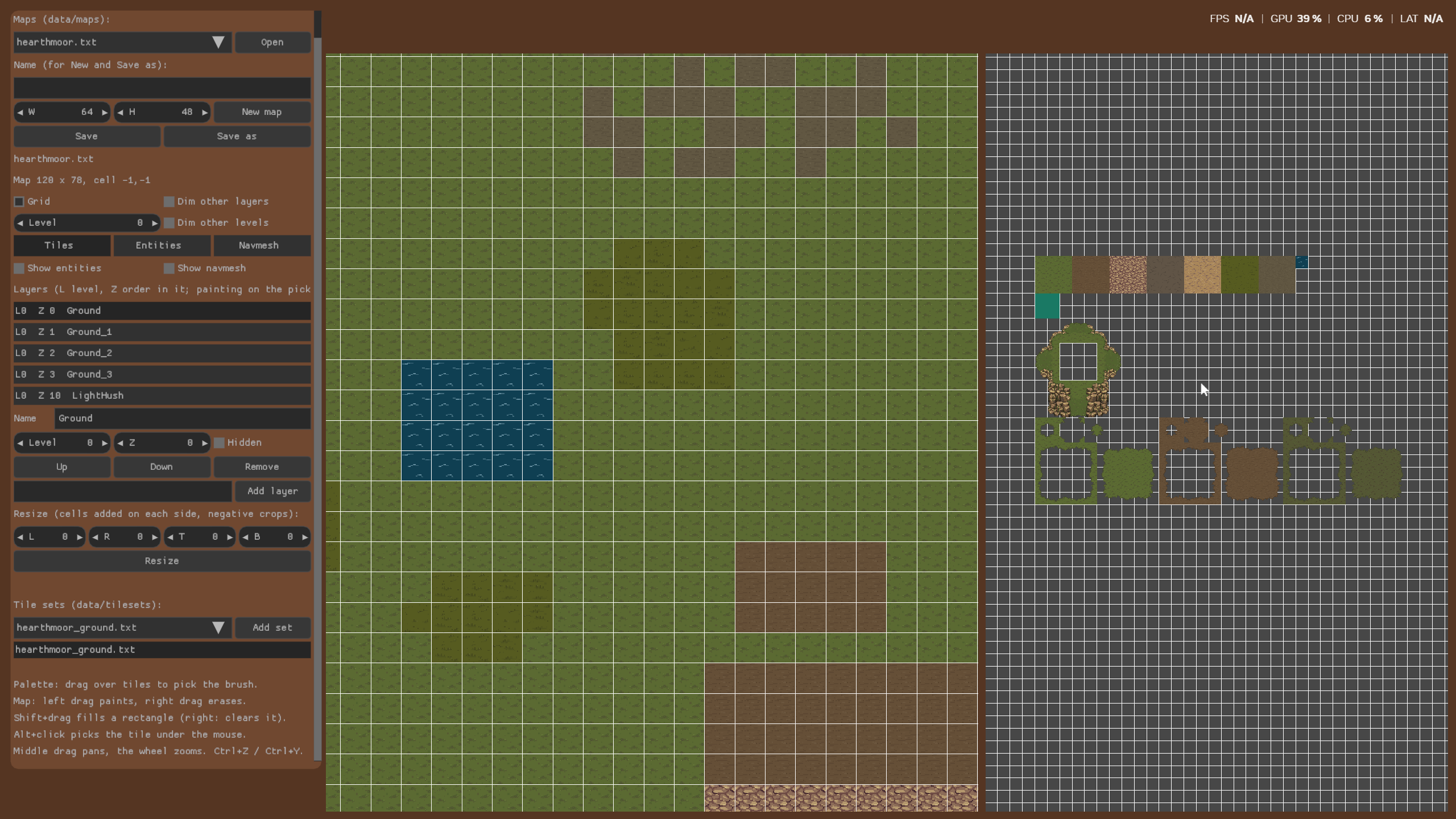
Hearthmoor in the map editor, with the layer list on the left and the tile set palette on the right
Entities, Four Times
The tiles went smoothly. Everything standing on them didn’t.
Spellweaver’s idea is that everything in the world reacts to the elements, so the question was how much of that should be data. My four designs, in order:
Object sets with a material and rules table. Objects grouped into files, each with a material, and a table saying what each material does when hit by each element. I built the data, the asset packing, the game API and a view, and then I looked at it and removed all of it.
Entities with types. Everything except ground tiles became an entity. A project listed its types with their states and fields, and a new entity editor filled them in. This was closer, but a burning tree, a burnt tree and a rotten tree were one entity with a lot of states.
Definitions with blocks. A definition became one thing in one state, so those trees are three definitions. On top of a core that the engine knows about, a project could declare blocks of fields, list fields for reactions, and materials with default reactions, and maps could override any field on a placed entity. It worked, and it was a lot of machinery, for one game that could say all of it in C.
Definitions, simplified. The final version keeps only what any game needs: a name, a GUID, a display name, a type, clips, a footprint and a hit area. The project lists its types and clip names in a text file. Blocks, rows, materials and overrides are all gone, from the files, the editors, the asset file and the API. A map places a definition with a position, a flip and a level. What a thing does is the game’s code, chosen by its type.
Looking back, this is the same decision I wrote about last December: the engine should be a library that does the common work, and each game writes its own systems. I knew that, and I still had to build the big version to see it applied here.
What’s Left of Entities
What survived is small and useful.
The GUID is 64 random bits, made once when the definition is created and never changed. Maps, the asset file and future saves refer to definitions by it, so renaming a file doesn’t break anything.
Clips are named animations like Idle or Walk, each a bitmap or a sprite sheet with a speed and a loop flag. Each clip can have its own foot, the point of the picture that stands on the ground, set by dragging the picture in the entity editor. The footprint is what blocks movement, and the hit area is what spells and interactions hit. Each is a circle, a box, or nothing.
To get art in, the assets mode gained a cut tool. It opens any sheet, selects a rectangle, and saves it as a PNG, or saves animation frames side by side as a strip. It only cuts, on purpose. The result is a normal file that goes through the normal asset steps.
Placing is what you’d expect: place, move, snap on a key, flip and remove, with undo. The newest tool is a scatter brush, because nobody wants to place a hundred flowers one by one. It lays copies of the picked definition inside a circle, none closer than a spacing value to another, flipped at random if you want. A right drag takes them away, and a whole stroke is one undo step.
What’s Next
Two things are still missing from the editor. The first is playing from it: a key that starts the game on the map being edited, and another that brings you back to where you were. That’s the last phase of the plan.
The second came from actually using all of this. Adding a new file means adding it by hand in the assets mode, stopping the game, and writing the asset file. The packed file itself isn’t slow, the manual steps are. It’s fine once and annoying when you’re doing it every few minutes, so that’s the next thing I want to fix, before going further with Hearthmoor.
The biggest part of the map editor is left for the next post: levels, and the return of navigation meshes.